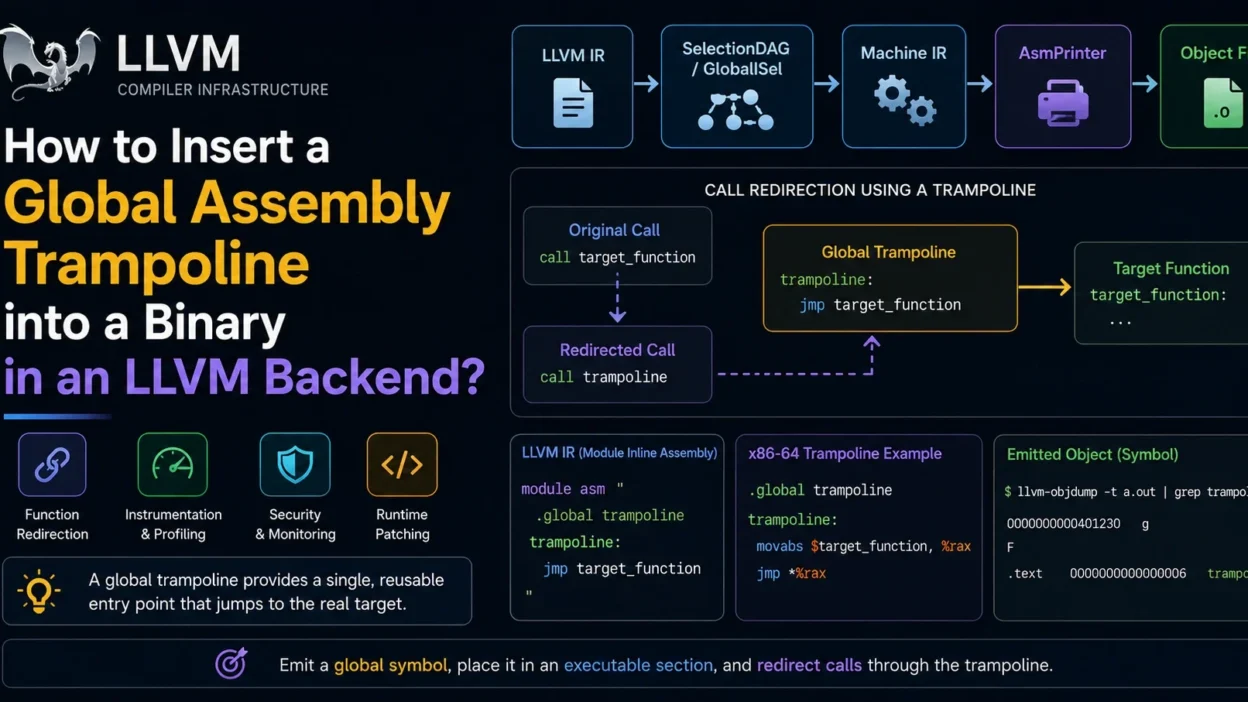
When developing a custom LLVM backend or modifying an existing one, you may occasionally need to insert a global assembly trampoline into the generated binary. Trampolines are commonly used for function redirection, instrumentation, runtime patching, security mechanisms, and architecture-specific control-flow handling.
This guide explains what assembly trampolines are, why they are used, and several approaches for inserting them within LLVM-generated binaries.
What Is an Assembly Trampoline?
A trampoline is a small piece of code that redirects execution to another function or address.
For example:
trampoline:
    jmp target_function
Instead of calling the target directly, execution passes through the trampoline first.
Common uses include:
- Function hooking
- Profiling and instrumentation
- Dynamic code patching
- Runtime dispatch
- Security monitoring
- ABI compatibility layers
Why Insert a Global Trampoline?
Unlike function-local trampolines, a global trampoline exists independently in the binary and can be referenced from multiple locations.
Benefits include:
- Single reusable entry point
- Reduced code duplication
- Easier runtime patching
- Consistent redirection logic
Understanding LLVM’s Code Generation Pipeline
LLVM code generation generally follows these stages:
LLVM IR
    ↓
SelectionDAG / GlobalISel
    ↓
Machine IR
    ↓
AsmPrinter
    ↓
Assembly Output
    ↓
Object File
A trampoline can be inserted at multiple stages depending on your requirements.
Method 1: Emit Global Assembly Through Module Inline Assembly
One straightforward approach is adding module-level assembly.
Example:
module asm "
.global trampoline
trampoline:
    jmp target_function
"
When LLVM emits assembly, this code becomes part of the final output.
Advantages:
- Simple implementation
- Backend-independent
- Useful for prototypes
Disadvantages:
- Target-specific syntax
- Limited backend integration
Method 2: Emit Trampoline in AsmPrinter
Many backend developers implement trampolines inside the AsmPrinter phase.
Example concept:
void MyAsmPrinter::emitTrampoline() {
    OutStreamer->emitLabel(TrampolineSymbol);

    OutStreamer->emitInstruction(...);
}
This approach provides:
- Full target control
- Proper symbol handling
- Integration with object generation
The trampoline becomes a regular binary symbol.
Method 3: Create a Dedicated Machine Function
Another approach is generating a synthetic machine function.
Example workflow:
Create Function
       ↓
Generate MachineFunction
       ↓
Emit Jump Instructions
       ↓
Include in Final Binary
Benefits:
- Uses LLVM’s normal code-generation pipeline
- Works naturally with optimization passes
- Easier maintenance
This method is often preferred for large backend projects.
Method 4: Emit During Object File Generation
Some backends inject custom sections directly.
Example:
MCSection *Section =
    OutContext.getELFSection(
        ".trampoline",
        ELF::SHT_PROGBITS,
        ELF::SHF_ALLOC |
        ELF::SHF_EXECINSTR
    );
Then emit instructions into that section.
Advantages:
- Fine-grained control
- Custom executable sections
- Useful for runtime loaders
Example x86-64 Trampoline
A simple trampoline might look like:
.global trampoline

trampoline:
    jmp target_function
Or:
.global trampoline

trampoline:
    movabs $target_function, %rax
    jmp *%rax
The second version is useful when dealing with large address spaces.
Creating the Symbol
A trampoline generally requires a global symbol:
MCSymbol *Trampoline =
    OutContext.getOrCreateSymbol("trampoline");
Then emit:
OutStreamer->emitLabel(Trampoline);
This allows other code to reference it normally.
Redirecting Calls Through the Trampoline
Original:
call target_function
Redirected:
call trampoline
The trampoline then transfers control to the real destination.
This design simplifies future modifications because only the trampoline must change.
Architecture-Specific Considerations
x86-64
Common instructions:
jmp target
or
movabs
jmp *%rax
ARM64
Typical form:
b target
or:
adrp
add
br
RISC-V
Common implementations use:
jal
or indirect branch instructions.
Each backend requires target-specific instruction emission.
Common Pitfalls
Symbol Visibility Issues
If the trampoline isn’t globally visible:
.global trampoline
other code may not be able to reference it.
Incorrect Section Placement
Executable code must be emitted into executable sections.
Placing trampolines into data sections will usually cause runtime failures.
Relocation Problems
Direct jumps may not work across large address ranges.
Indirect jumps are often safer for position-independent code.
Optimization Interference
Aggressive optimization passes may remove unused trampolines.
Ensure references exist or mark symbols appropriately.
Debugging Trampoline Emission
Useful LLVM tools include:
llc
llvm-objdump -d
llvm-readobj
These allow verification that:
- The symbol exists
- The section is correct
- The instructions were emitted properly
Recommended Approach
For production LLVM backends, the most maintainable solution is usually:
- Create a dedicated symbol
- Emit trampoline code in the AsmPrinter
- Place it in an executable section
- Redirect calls through the symbol
This integrates cleanly with LLVM’s backend architecture and works consistently across optimization levels.
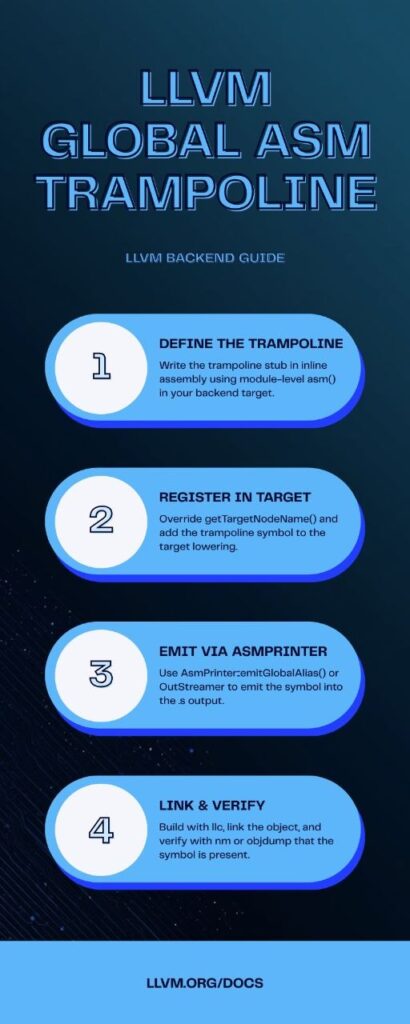
Infographic
Conclusion
Global assembly trampolines provide a flexible way to redirect execution, implement hooks, and support runtime instrumentation in LLVM-generated binaries. While module-level assembly can work for simple cases, emitting trampolines through the AsmPrinter or a dedicated machine function generally provides better integration and maintainability. Choosing the right insertion point depends on your target architecture, backend design, and runtime requirements.