
Searching through deeply nested objects is a common challenge in modern applications. Whether you’re working with JSON data, API responses, configuration files, or complex application states, inefficient searches can quickly become a performance bottleneck.
In this guide, we’ll explore practical techniques to optimize deeply nested object searches and improve application performance.
Understanding the Problem
Consider the following nested object:
const data = {
    users: [
        {
            id: 1,
            profile: {
                settings: {
                    theme: "dark"
                }
            }
        }
    ]
};
A simple search might require traversing multiple levels:
data.users[0].profile.settings.theme
When dealing with thousands of objects and deep nesting, repeated traversal can become expensive.
Why Deep Searches Become Slow
Performance issues often arise because:
- Large object trees require many recursive calls
- Repeated traversals visit the same nodes
- Nested loops increase complexity
- Frequent searches duplicate work
For small datasets this is negligible, but with large structures the impact becomes noticeable.
Method 1: Use Direct Access When Possible
Instead of searching repeatedly:
function findTheme(data) {
    return data.users[0].profile.settings.theme;
}
Store frequently used references:
const settings =
    data.users[0].profile.settings;

console.log(settings.theme);
Benefits:
- Fewer property lookups
- Faster access
- Cleaner code
Method 2: Build an Index
If searches happen frequently, create an index.
Example:
const userIndex = {};

users.forEach(user => {
    userIndex[user.id] = user;
});
Lookup becomes:
const user = userIndex[42];
Instead of:
users.find(
    user => user.id === 42
);
Why It’s Faster
Without indexing:
O(n)
With indexing:
O(1)
This can dramatically improve performance on large datasets.
Method 3: Use a Map Instead of Objects
For large collections:
const userMap = new Map();

users.forEach(user => {
    userMap.set(user.id, user);
});
Retrieve:
const user =
    userMap.get(42);
Maps are optimized for frequent lookups and can outperform traditional object searches.
Method 4: Cache Search Results
If the same search occurs repeatedly:
const cache = {};

function getUser(id) {

    if (cache[id]) {
        return cache[id];
    }

    const user =
        searchNestedObject(id);

    cache[id] = user;

    return user;
}
Benefits:
- Eliminates repeated traversals
- Reduces CPU usage
- Improves response time
Method 5: Avoid Unnecessary Recursion
A typical recursive search:
function search(obj, key) {

    for (let prop in obj) {

        if (prop === key) {
            return obj[prop];
        }

        if (
            typeof obj[prop] ===
            "object"
        ) {

            const result =
                search(
                    obj[prop],
                    key
                );

            if (result) {
                return result;
            }
        }
    }
}
While recursion is elegant, excessive nesting may lead to:
- Increased memory usage
- Stack overflow risks
- Slower execution
Method 6: Use Iterative Traversal
Instead of recursion:
function search(root, target) {

    const stack = [root];

    while (stack.length) {

        const current =
            stack.pop();

        for (const key in current) {

            if (key === target) {
                return current[key];
            }

            if (
                typeof current[key]
                === "object"
            ) {
                stack.push(
                    current[key]
                );
            }
        }
    }
}
Advantages:
- Better memory control
- Avoids deep call stacks
- Often faster for large structures
Method 7: Flatten the Data Structure
Deep nesting itself can be the problem.
Instead of:
{
    company: {
        departments: {
            sales: {
                manager: {
                    name: "John"
                }
            }
        }
    }
}
Consider:
{
    managerName: "John"
}
Or:
{
    salesManager: "John"
}
Flatter structures reduce traversal overhead.
Method 8: Preprocess Data
If data rarely changes:
const processed =
    preprocess(rawData);
Then search the optimized structure:
processed[id]
rather than traversing the raw object repeatedly.
Measure Before Optimizing
Always benchmark first.
Example:
console.time("search");

search(data, "theme");

console.timeEnd(
    "search"
);
Sample output:
search: 2.3ms
Optimization efforts should focus on actual bottlenecks rather than assumptions.
Common Mistakes
Repeated Full Traversals
Avoid:
search(data, key1);
search(data, key2);
search(data, key3);
Each search scans the structure again.
Deep Nesting by Design
Excessive nesting often causes performance and maintenance issues.
Whenever possible:
- Normalize data
- Flatten structures
- Use lookup tables
Ignoring Caching
Repeated searches without caching waste CPU resources.
Best Practice
For most applications:
- Flatten data where practical.
- Build indexes for frequent lookups.
- Use Maps for large datasets.
- Cache expensive searches.
- Benchmark before and after optimization.
These techniques usually provide the biggest performance improvements with minimal complexity.
Infographic
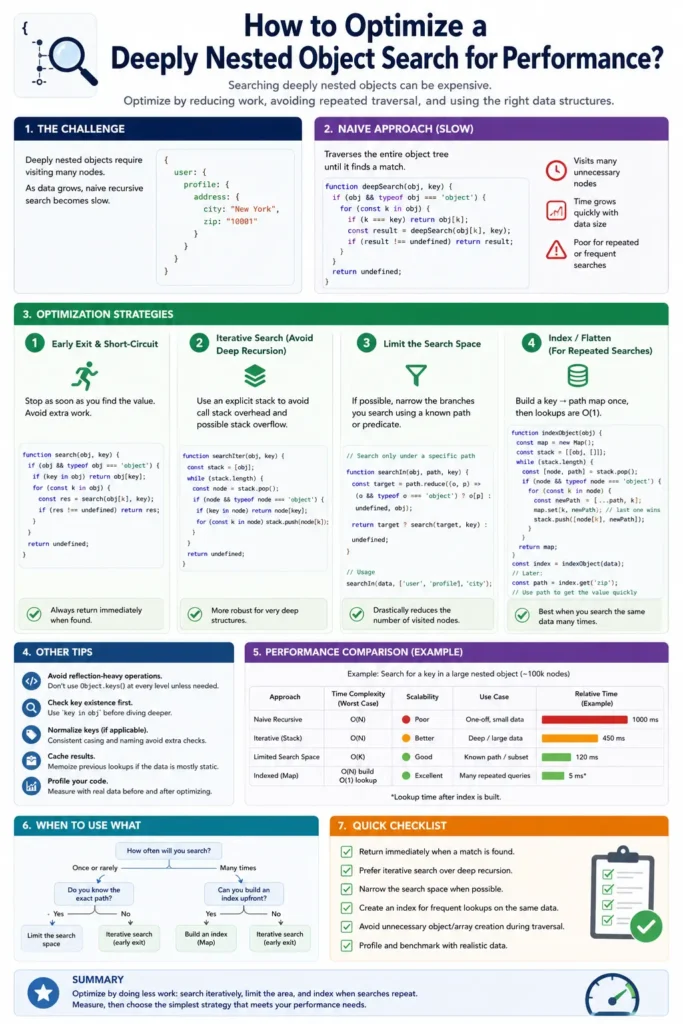
Conclusion
Optimizing a deeply nested object search is less about writing clever search algorithms and more about reducing the amount of work your application performs.
By using indexing, caching, Maps, iterative traversal, and better data structures, you can significantly improve search performance while keeping your code easier to maintain.
Happy Coding!