
When working with maps in programming languages such as Java, Kotlin, Dart, or other languages that support key-value collections, you may occasionally need to convert a single MapEntry into a Map.
Many developers know the basic approach, but there are actually several ways to perform this conversion depending on the language and use case.
In this guide, we’ll explore different techniques for converting a MapEntry into a Map and discuss when each approach is useful.
What Is a MapEntry?
A MapEntry represents a single key-value pair.
For example:
MapEntry<String, int> entry = MapEntry('age', 25);
This entry contains:
- Key:
"age" - Value:
25
However, a MapEntry is not itself a Map.
To use it where a map is required, you’ll need to convert it.
Method 1: Create a Map Literal
The most straightforward approach is creating a map directly.
Map<String, int> map = {
  entry.key: entry.value
};
Output:
{age: 25}
This is usually the cleanest and most readable solution.
Method 2: Using Map.fromEntries()
If you have one or more entries, Map.fromEntries() is often the preferred method.
Map<String, int> map = Map.fromEntries([
  entry
]);
Output:
{age: 25}
This method becomes especially useful when working with collections of entries.
Method 3: Convert Multiple Entries at Once
Suppose you already have a list of entries.
final entries = [
  MapEntry('name', 'John'),
  MapEntry('age', 25),
  MapEntry('city', 'London')
];
You can convert them into a map:
final map = Map.fromEntries(entries);
Result:
{
  name: John,
  age: 25,
  city: London
}
This is one of the most common real-world use cases.
Method 4: Using a Constructor
Another approach is creating an empty map and inserting the entry manually.
final map = <String, int>{};

map[entry.key] = entry.value;
This works well when building a map incrementally.
Method 5: Using Spread Syntax
Modern Dart versions support spread operators.
final map = {
  ...{
    entry.key: entry.value
  }
};
While functional, this approach is generally more verbose than necessary for a single entry.
Method 6: Helper Function
If you perform this conversion frequently, a helper function can improve readability.
Map<K, V> entryToMap<K, V>(MapEntry<K, V> entry) {
  return {
    entry.key: entry.value
  };
}
Usage:
final map = entryToMap(entry);
This keeps conversion logic reusable across a project.
Which Method Is Best?
For a single entry:
{
  entry.key: entry.value
}
is usually the simplest and most readable solution.
For multiple entries:
Map.fromEntries(entries)
is generally the preferred option.
Performance Considerations
For a single MapEntry, the performance difference between approaches is negligible.
Choose the method that:
- Maximizes readability
- Matches your coding style
- Fits naturally into your existing code
Premature optimization is rarely necessary for such a small operation.
Common Mistakes
Trying to Cast Directly
This will not work:
final map = entry as Map;
A MapEntry and a Map are different types.
Forgetting Generic Types
Avoid:
final map = {
  entry.key: entry.value
};
when type inference may become ambiguous.
Being explicit with types can improve code clarity.
Using Complex Conversions for a Single Entry
Creating lists and calling Map.fromEntries() for one item works, but it may be unnecessarily verbose compared to a simple map literal.
Infographic
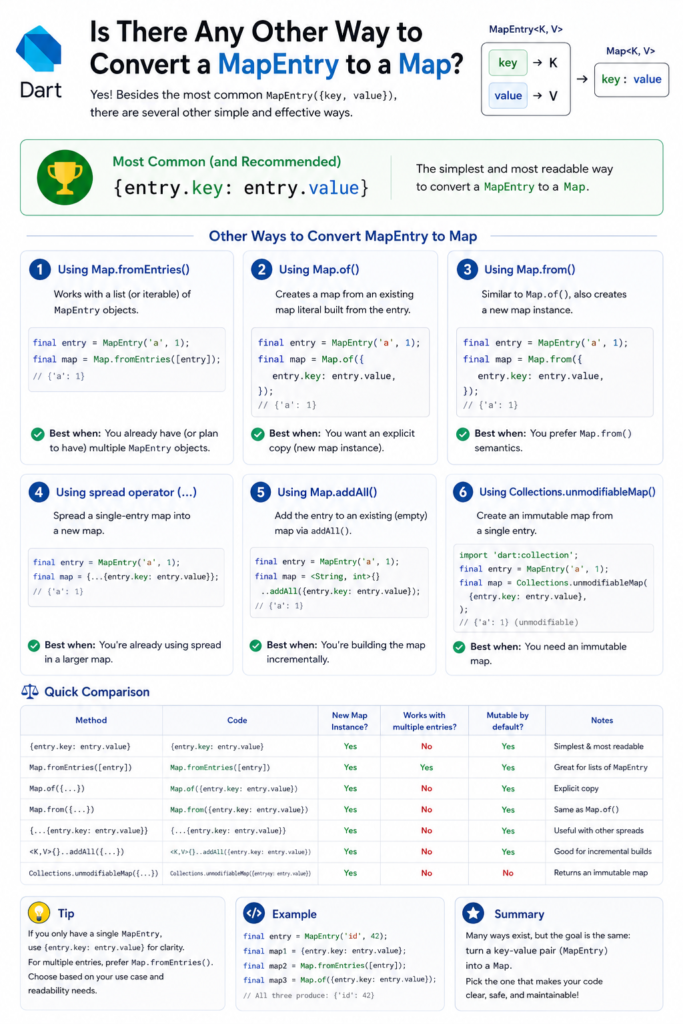
Conclusion
Yes, there are several ways to convert a MapEntry to a Map. The simplest solution is often creating a map literal using the entry’s key and value. For collections of entries, Map.fromEntries() provides a clean and scalable approach.
The best choice depends on your specific use case, but in most situations readability should take priority over minor implementation differences.